
Tidy up the whole Desktop.
No more sea of numbers, jumbles, and dates. You check every name before anything changes, and the first Tidy Up is free.
Nameshot gives every new screenshot the name you would have typed, right on your Mac. Zero permissions.
Behind the words, a Mac desktop full of screenshots with names like “Screenshot 2026-10-12 at 9.41.07 AM”. One by one they become “Q3 Revenue by Region”, “Lisbon Flight Confirmation” and “Harbor Street Coffee Order”.

Press ⌘⇧4 like you always do. There’s nothing new to learn.
The words, the layout and the app it came from, read on your Mac in a second or two.
A real name, right on the file. Not quite right? Click it and type your own, or Undo.
No more sea of numbers, jumbles, and dates. You check every name before anything changes, and the first Tidy Up is free.
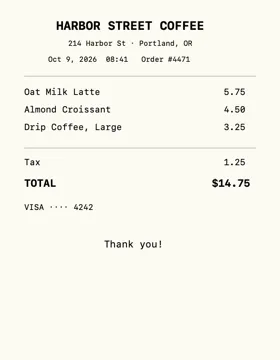 Harbor Street Coffee Order
Every rename can go back, from the pill or from the menu.
Rename mistakes in a quick click: just type over the name in the pill.
Inspiration, Downloads, and that one folder you shoved everything else in. Drop four or more to tidy them all at once.
It gets smarter with your corrections over time (all on device!)
Swap the face for a scan line in Settings.
Little face. Big mood. A little guy who lives in your menu bar: watches screenshots land, reads them, perks up when you drag a file over, and looks a bit sheepish when you press Undo.
No subscription. After the trial, Nameshot still suggests a name for every screenshot, and you can use ten of them a week for free.
Needs a Mac with Apple silicon and macOS 27. Names are best with Apple Intelligence turned on.